
Videovalve täislahendus Synology Surveillance Station
Synology Surveillance Station on videovalve tarkvara, mis sobib hästi nii kodu- kui väikekasutajatele videovalveks või väiksemate nõudmistega suurklientidele, kes vajad küll 24/7 videovalvet, kuid sooviks tarkvaralahenduse pealt natuke kokku hoida.
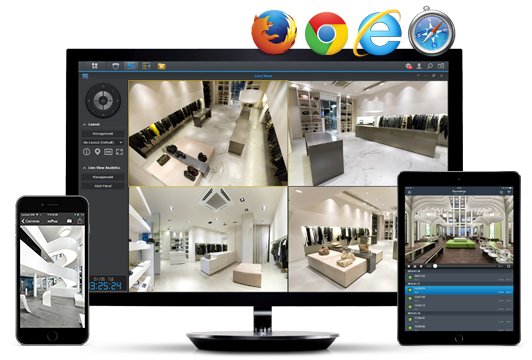
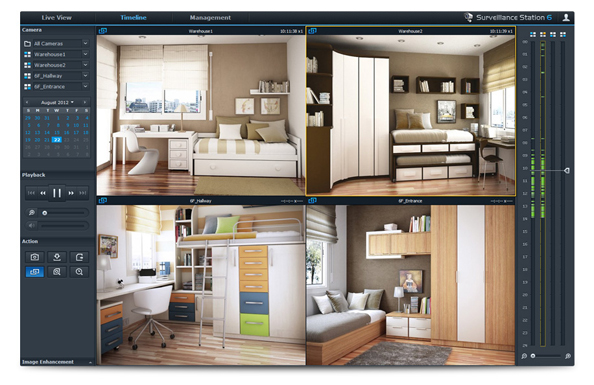
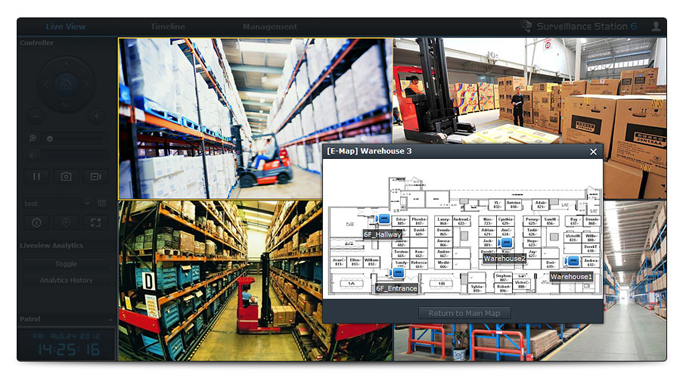
Synology Surveillance Station on tasuta allalaaditav kõigile Synology NAS-idele Package Centerist ning pakub ühise veebipõhise monitoorimis– ja salvestuskeskuse võrku ühendatud IP-kaameratele. Surveillance Station aitab jälgida otsepilti paljudest IP kameratest korraga ühel ekraanil, mängib maha videosalvestusi, aitab seadistada kaameraid nii ükshaaval kui mitmeid korraga, võimalik on luua häirete reegleid ning teadete saatmist. Surveillance Station töötab veebipõhiselt ja on ühilduv kõigi enamlevinud brauseritega. Nii korterit, eramaja kui kontorit turvav videovalvelahendust saab lisaks juhtida ja jälgida ka mobiilsetest seadmetest: toetatud on Windows, Mac OS, IOS, Android, millele saab alla laadida vastavad mobiilirakendused.
Lihtne ja mugav kasutajaliides
Surveillance Stationi paigaldamine on lihtne. Paigaldada tuleb vaid IP kaamerad ja Synology NAS seade, seejärel peab Surveillance Stationist lisama võrgus olevad kaamerad ja kiire seadistusviisardiga saab oma videovalvelahenduse lihtsalt tööle. Veelgi rohkem aitab aega kokku hoida kaamerate grupiti seadistamine ning grupihaldus, kui valvesüsteem koosneb rohkematest seadmetest.
Ühilduv kuni 4000 kaameramudeliga
Iga ostetud Synology NAS-iga on kaasas kaks tasuta kaameralitsentsi, et on võimalik hakata kohe kasutama lihtsat videovalvelahendust kodus või väikekontoris. Kaameralitsentse saab hiljem juurde osta just nii palju, kui vaja ning mida konkreetne Synology NAS kasutada võimaldab. Olenevalt mudelist toetab riistvara 5-80 IP-kaamerat. Surveillance Station tunneb ära ja ühildub ligi 4000 erineva kaameramudeliga 90-lt tootjalt. ONVIF Profile S ja Profile G kindlustavad, et videovalvelahendusega saab liita ka selliseid kaameraid, mis eraldi toetatute nimekirjas pole.
Korraga saab oma arvuti ekraanile kuvada kuni 49 kaamerapilti ning kui on vaja ühe kaamera ees toimuvat täpsemalt jälgida, siis saab selle akna ühe klõpsuga täisekraanile kuvada.
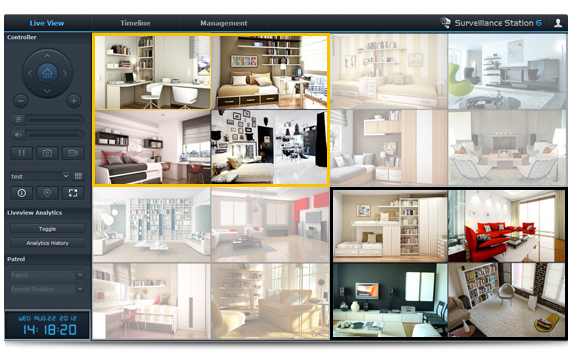
Salvestusgraafikuid võib seadistada kaamerapõhiselt. Eraldi saab määrata, millal salvestab kaamera katkematut pilti, reageerib liikumisele või alarmsignaalile. Häireteade jõuab kasutajale e-posti, SMS-i või Skype´i vahendusel.
Lisaks veebipõhisele liidesele ühildub valvesüsteem ka mobiilseadmetega. Erirakendused on tasuta allalaetavad nii iPhone´ile, iPadile kui Androidiga nutitelefonile või tahvelarvutile. Sel viisil saate hoida oma varal silma peal kus iganes ka ei viibiks ning kohe sekkuda, kui olukord seda nõuab.
Turvaline ja laiendatav salvestusmaht
Surveillance Station salvestab videod teie Synology salvestusseadmesse, mille mahtu saab vastavalt vajadusele suurendada. Samuti tagab Synology NAS andmete turvalisuse, kasutades RAID-i ühendatud kõvakettaid ja varundust.
Keskne haldus – kõik vajalikud seadistused ühest kohast
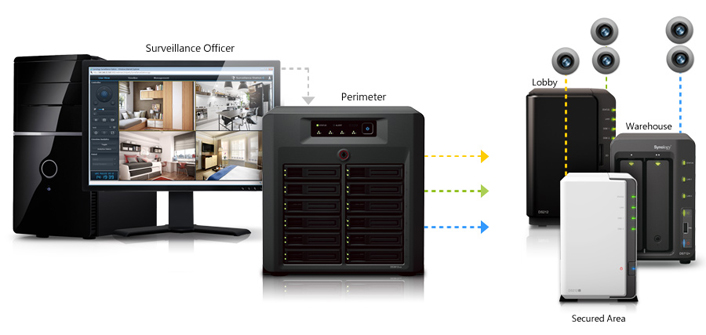
Central Management System (CMS) ehk keskne haldussüsteem on loodud selleks, et videovalve lahendust oleks võimalik keskelt seadistada ja jälgida ühest kohast. Nii saab ühendada valvesüsteemi mitmed valvatavad objektid ja teha mitme serveriga lahenduse. CMS koosneb keskserverist ja salvestusserveritest. Viimased võivad asuda erinevates kohapealsetes kontorites, keskse serveriga aga saab ühest kohast kõiki neid hallata.
Synology Surveillance Stationi põhiomadused
- Veebipõhine monitoorimiskeskus
- Ühe serveriga kuni 49 Full HD kaamerapilti ekraanil
- Mitme serveri ühendamisvõimalus ühtsesse süsteemi
- Salvestamine graafiku alusel
- Alarmteated ja liikumistuvastus
- iPhone´i, iPadi ja Androidiga seadmete tugi
- Graafiline sündmuste kalender
- Nutikad videoarhiivi otsivahendid
- Tasuta tarkvarauuendused
Serverivalik – kuidas leida oma valvesüsteemile jõukohane salvesti
Synology pakub videovalveks täislahenduse: serveri, et salvestada videoid, kaameralitsentse IP kaameratele, videote haldamiseks vajaliku tarkvara ja mitmeid mugavaid lisaomadusi valvesüsteemi kasutamiseks. Seega saab Synology lahendusega algusest lõpuni hakkama.
Oma vajadustele sobiva NVR-i ehk video võrgusalvestusseadme saab valida siit:
https://www.synology.com/en-uk/support/nvr_selector
Lisaks videovalvele ka kõik muu vajalik kaasas
Synology eeliseks videovalvelahendusena on ka mitmete lisavõimaluste kaasatulek nö kauba peale, sest Synology NAS-i tarkvaras on olemas peale Surveillance Stationi videovalvetarkvara ka DHCP, syslog, VPN, NTP ja palju muud. Seega pole põhjust lisafunktsioonide jaoks eraldi seadet otsima hakata, kõik vajalik võib asuda ühes Synology serveris.
Toetatud IP-kaamerad
Enam kui 4000 kaamerat tuntud tootjatelt nagu AXIS, ACTi, Cisco, D-Link, Edimax, HikVision, IQinVision, JVC, Levelone, Linksys, MOBOTIX, Panasonic, Sanyo, Siemens, Sony, TRENTNet, Vivotek jt.
Täielik nimekiri toetatud kaameratest asub siin:
https://www.synology.com/en-uk/support/camera
Synology Surveillance Station 7.1 tehnilised andmed:
https://www.synology.com/en-uk/surveillance/7.1/overview

